Monday, July 16, 2018

Take Graphs and Anchor Charts to the Next Level With OneNote

When you create graphs and anchor charts in OneNote, not only do students have the ability to use digital inking, they can record their voice too!

The OneNote pages in this post were created/used in OneNote for Win10, there are differences between OneNote 2016 and OneNote for Win10...but they can be used interchangeably. For more info: What's The Difference Between OneNote and OneNote 2016

First Day Jitters is one of my favorite back to school books. There are so many great activities to use with it...and adding OneNote can take those great activities to the next level!


In Kindergarten I would complete these  First Day Jitters activities in a whole/small group setting with guided discussions. 

First Day Jitters Character Discussion:
Prepare your page by adding a Title/Sentence Starter and Question if desired. I drew a picture of the character, however other options would be to have a student/students draw the character, or add a photo of the character to OneNote.

Since this activity would be part of our "First Days of School" activities most of my students would not be ready to write in complete sentences; however the majority have the ability to express their thought by speaking in complete sentences. As students generate ideas they can be added to the character discussion chart and their voice can be recorded. 

The option to record audio can be found under the Insert Tab. Place your curser in the are you would like the recording to show, and then click audio to begin recording. The recording can be moved when finished if needed. For more info: Record Audio or Video Notes


Recording student voices certainly adds an element of fun to the activity, but it also helps students make a connection between spoken and written words. 


First Day Jitters Graph and Discussion:
Prepare the graph by adding a table with the desired number of cells to your OneNote page. The option to insert a table can be found under the Insert Tab. Change the width of the cells by dragging the edges outward, change the height of the cells by highlighting the cells and enlarging font size. For more info: Insert a Table in OneNote For Win10 or Insert Table (OneNote 2016)


Students can select their favorite color of highlighter to mark their response on the graph (the highlighter works well because of it's width, it fills the space in nicely.) If you have students add their responses in a small group setting or have them come for one on one time, you might want them to record their reason for marking yes or no on the graph.  The opportunity to verbalize and discuss feelings helps students feel valued and can lead to a positive classroom environment.


Another idea...that just occurred to me. Share your graph results with students from another school..communicate using Skype or Flipgrid and allow students to share the reasons for their responses.

I will have a OneNote Notebook ready to share very soon, to provide more interactive examples with OneNote.

Sunday, July 15, 2018

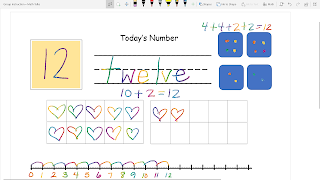
Today's Number and OneNote

These resources can be used with OneNote for Whole Group Instruction / Calendar Time / Number Talks, etc.
If you or your students are new to OneNote these ideas could be just what you need to get started.

Start by adding the desired page or pages to OneNote Notebook.
    The templates I'm sharing have been saved as pdf.
    Open the desired file, select pint, and choose print to OneNote -or-
    Save the desired file, open OneNote, go to insert, click the file, insert pdf
Open OneNote and project to your interactive whiteboard. Once you have done this you can work through the Todays Number pages by allowing students to take turns filling in the answers on the interactive whiteboard, or students could work along on their own devices in OneNote Class Notebook, if devices are available.

These pages were opened in OneNote Win10...because we love the special pens!!

Option 1
The rainbow pen is always a favorite!
 Option 2
The rainbow pen is fun but the galley pen is pretty cool too!
Option 3
The pencil design was chosen from stickers within OneNote.

Wednesday, July 11, 2018

Teaching Math--Show What You Know With Sway

The Sway featured in this post was created in a class with only 4 iPads.  First grade students were divided into groups, they worked together to solve math equations, students then took turns using the iPads to photograph and load their work into the Sway. (Because of the limited number of devices all iPads were logged into my account. Logging in and out would have been quite time consuming, additionally iPad apps are designed for single user use and logging in and out can be tricky.)

After the Sway was completed students discussed and shared their math equations. The Sway was also shared with parents via email, and Class Dojo.

For more information check this out: Getting Started With Sway
OR check out the great resources that can be found in the Microsoft Educator Community.

Tuesday, July 10, 2018

"Prepare Your Sentence" Writing Prompt for OneNote

"Prepare Your Sentence" writing prompts can be used in
Power Point or the slides can be added to OneNote!


I teach kindergarten so these slides will be added to our Daily Practice OneNote Notebook. We use this notebook for whole group and small group instruction/collaboration...students dictate sentence ideas and I model the writing, when students are ready we will transition to independent writing. By adding these or other prompts to OneNote Class Notebook a writing journal could be created for each student!


Not sure how to add documents to OneNote? 
Adding Power Point presentations, photos, or other documents to OneNote is easy! 


Print To One Note: Open the document you would like to add. Click on File, select print, and where the printer is specified choose OneNote. Just like that your document is printed to OneNote.

Insert File Printout: Open OneNote and locate the section and page where you would like the document to be added. Click on the insert tab (one of the tabs in the top ribbon), choose File Printout. You will then be prompted to choose the file you would like to add.

Monday, July 9, 2018

Base Ten Practice for OneNote #ElemMIE

I LOVE Microsoft!
For real guys...OneNote, Sway...Microsoft is where it's at...BUT I teach Kindergarten and I've not found much being shared about using Microsoft in the early grades. So last year I purchased the book Google Apps For Littles, by Christine Pinto & Alice Keeler, and I started following #GAFE4Littles on Twitter. I've learned a lot from the book and the Twitter community!

Next step...take what I've learned and start creating and sharing ideas for using Microsoft O365 in early childhood/elementary classrooms.  My hope is that by sharing my ideas others will share theirs and we can create our own #ElemMIE community on Twitter.  There is nothing quite like the support of a strong PLN!

What I'm sharing today is simple and could be used for grades K-2 (maybe older). The Slides can be used directly from Power Point, however my plan is to print the slides to OneNote (add base 10 block clip art) and use as part of our daily math lessons/small groups. This will give students the opportunity to use OneNote and experience the technology while learning a vital math skill.
(Additionally parents can access OneNote for at home practice.) 

Base Ten Practice
(Download a copy, save as, and you should be able to edit as needed.)

Wednesday, March 28, 2018

About this #OklaEd funding crisis...


I’m going to be honest friends, I’m torn, confused, and discouraged.  
I want to be excited about HB1010xx.  I know hours of work went into preparing the bill.  I appreciate the fact that Republicans and Democrats came together to pass legislation to fund public education. Maybe if I was just looking for was a pay raise I could be happy…BUT folks what I really want is a solution to the teacher shortage, and I don’t believe $5,000 is going to cut it. Some say it’s a start, and I could get on board with that kind of thinking, but I’m not so sure it’s being viewed as a start…it seems like it’s supposed to be the fix.
Last year I had 29 first graders in my class.  It wasn’t because the district wouldn’t hire another teacher, it was because there were no qualified applicants.  This scenario is common across our state…TEACHERS ARE LEAVING!  If they’re not leaving the state they’re leaving the profession.  Our Education grads are being recruited by other states, and they’re gladly going.  Many 1st year teachers in Texas make more than I do after 8 years.  Fewer and fewer young people are choosing to become teachers and who can blame them? 
I don’t claim to be the best teacher out there, but I get the job done.  I love my students and am committed to working to meet their individual needs…however that was hard to do with 29 first graders.  I went home most days feeling defeated because I didn’t feel like I had done enough.  Studies show that small group instruction is most effective…but imagine trying to see 29 students in small groups for math and reading, providing hands on learning opportunities, centers/stations and still making time for science, and social studies. It’s no easy task. Not to mention the space issue…most classrooms are not designed to hold 29 students. Our kids deserve better!!!
I don’t know what needs to happen for our communities and government to value children.  We can say we value them, but if we won’t fund education making sure they have highly qualified teachers, small class sizes, and quality learning environments…where is the evidence that they’re valued.
Please understand education today isn’t what it was 20 or even 10 years ago.  I’ve seen posts saying things like “Teachers need to stop complaining, they knew what they were getting into”. My response to that is yes, I did, I knew what I was getting into 20 years ago…but it was nothing like teaching today.  Yes, teacher pay was low but I assumed there would be more pay increase over the years. As far as academics go, my first teaching job was teaching kindergarten a little over 20 years ago.  My students learned to tie their shoes, say their address, phone number, write their name, recognize letters and sounds, recognize numbers, count, etc.  Fast forward to 2018 and I’m teaching kindergarteners to write their name, numbers, add, subtracts, read, read 61+ sight words, write sentences etc. And kindergarten is not the exception…if you haven’t been in a classroom for a while you might be surprised by the amount of material being taught.   Top all of that off with the pressures of standardized testing…Nope I Didn’t Know What I Was Getting Into.  College students today have the option to study Education. I know there are many who have a heart for service and some may even want to become teachers, but they see what they would be getting into, they see the lack of respect, the pressure, the pay…and they’re choosing another path.
I have such respect for the young teachers who have chosen to teach despite it all.  Thank you for choosing to teach…and thank you for choosing to stay!!!
I don’t have the answers…I don’t know how we pull ourselves out of this ditch…it may take time…but we have to find a way.

Tuesday, June 27, 2017

#notatISTE…But It’s Not So Bad


I was a little bummed thinking of all the techie goodness that would be at ISTE…while I sit at home! But then I found the #notatISTE community, and I was immediately challenged to do new things and grow my PLN.  I could have been packing my bags, printing by boarding pass, and finalizing travel arrangements; but instead I was getting my feet wet in the Google Community, learning to use Google Draw to make my badge, add ribbons, create my own ribbons, and use Voxer for the first time.


Thanks to an awesome team who organized the #notatISTE17Google Community and compiled the #notatISTE17 Live Binder I’ve been able to connect with what’s going on at ISTE.  Highlights for me so far have been the Badge Summit, “Give Every Pre-KStudents an iPad?” (shared presentation), and “Using Your iPad as a CreationDevice” (shared presentation).

One advantage of  not being at ISTE, I can multi task! I’ve cleaned the garage, worked in the flower bed, caught up on laundry, done some reading, and listened to books on Audible…my kiddos are at camp so I’ve been extra productive around the house and had added time for reading! Sure it would it be great to be at ISTE, but #notatISTE has it’s perks!!


#ISTE17 and #notatISTE reaffirms the fact that technology is a tool that can connects learners, and give all students the opportunity to participate and collaborate regardless of their location.

If you haven't joined the #notatISTE17 Google Community, or been following #ISTE17, #notatISTE, #notatISTE17 Twitter feeds it's not too late. Join the conversation connect with like minded educators and grow your PLN.

Thank you, Peggy George, Barb Cotter, Jennifer Wagner, Vicky Sedgwick (and anyone else that I missed) for making the #notasISTE Community and resources available!